Why I built LaTeX Suite
LaTeX is powerful, but writing it becomes tiring very quickly once a formula gets complicated. Most of the time, we end up spending more time jumping between braces than thinking about the formula itself.
For years, I dealt with this by moving my writing between several applications. Each one solved part of the problem, but none solved the whole thing. The LaTeX Suite desktop app came from wanting the formula editor to follow me, instead of moving the whole article around whenever I needed to write a formula.
The original problem
As an undergraduate, I was an active blogger on Zhihu (the Chinese equivalent of Quora) and wrote many articles there. The editor supported some basic formula input, but it was not designed for the amount of mathematics I wanted to write. Entering a simple expression was manageable. Entering many long or structurally complex expressions was tiring.
LaTeX was only part of the problem. I was also not satisfied with the general writing experience, so I began drafting articles in note-taking applications and pasting the rendered result into Zhihu.
SiYuan kindly provided a one-click export from Markdown to Zhihu-compatible HTML, which made publishing much easier. Still, its editor felt less polished to me than Notion. Notion, meanwhile, fit the way I wanted to manage personal notes: it was WYSIWYG, cloud-based, and less dependent on any one computer. That mattered at the time because my computer was suffering frequent blue screens of death.
Obsidian did not suit me as my main note-taking system. I prefer WYSIWYG editing, and a local-first application was not the best match for my circumstances then (a Windows PC that had a BSoD almost every day). Still, Obsidian had something genuinely excellent: the Obsidian LaTeX Suite plugin.
It was—and still is—excellent. Short triggers expanded into LaTeX, and Tab moved the cursor through the places I still needed to fill in. I could think about the formula instead of manually typing every backslash and brace.
The result was a pair of rather awkward workflows:
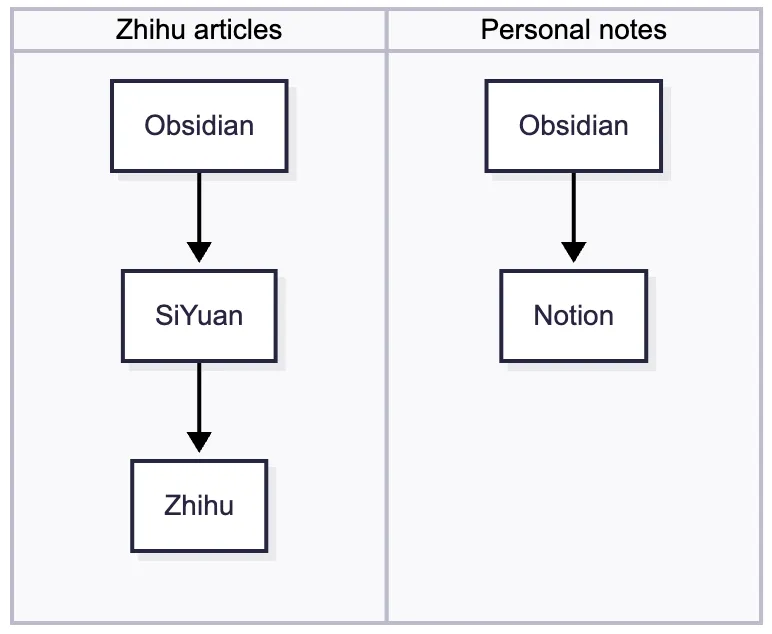
Both workflows worked, but in practice, I kept opening Obsidian only to write a formula, then pasting the result into the application where I was actually writing.
My AutoHotkey workflow
I next explored AutoHotkey and wrote a collection of scripts for inserting LaTeX snippets. It became my practical solution. The idea was similar to LaTeX Suite: type a short trigger and let the script replace it with a longer LaTeX expression.
The part I used most repurposed the otherwise-unused Insert key as a delimiter. I could press Insert, type a mnemonic such as a or int, and press Insert again to produce the corresponding symbol (unicode-math is wonderful btw!). Other hotstrings constructed LaTeX and then moved the cursor into position manually:
#Requires AutoHotkey v2.0

; Insert → mnemonic → Insert
*Insert::
{
    SendLevel 3
    Send "⬚"
}

; A few representative expansions
:*?CP2:⬚a⬚::α
:*?CP2:⬚int⬚::∫
:*?CP2:⬚->⬚::→
:*?CP2:\f ::\dfrac{{}{}}{{}{}}{Left 3}
This setup served me well for several years, but it was never as fast as Obsidian LaTeX Suite. Text replacement alone was not enough: once formulas became nested, I needed context-sensitive rules, regular-expression triggers, selections, placeholders, tabstops, and cursor movement that did not break.
I kept returning to the same question: why should this experience be confined to Obsidian?
The key idea
Obsidian's editor is built on CodeMirror, and Obsidian LaTeX Suite is, for the most part, a CodeMirror extension. That meant I could remove the Obsidian-specific logic, extract the editor into an independent component, and put it inside a small Electron desktop app.
The extracted extension became LaTeX Suite Core, a CodeMirror 6 extension based on Obsidian LaTeX Suite. I then wrapped it in Electron and connected the desktop app to whatever program I was already using.
The basic flow is:
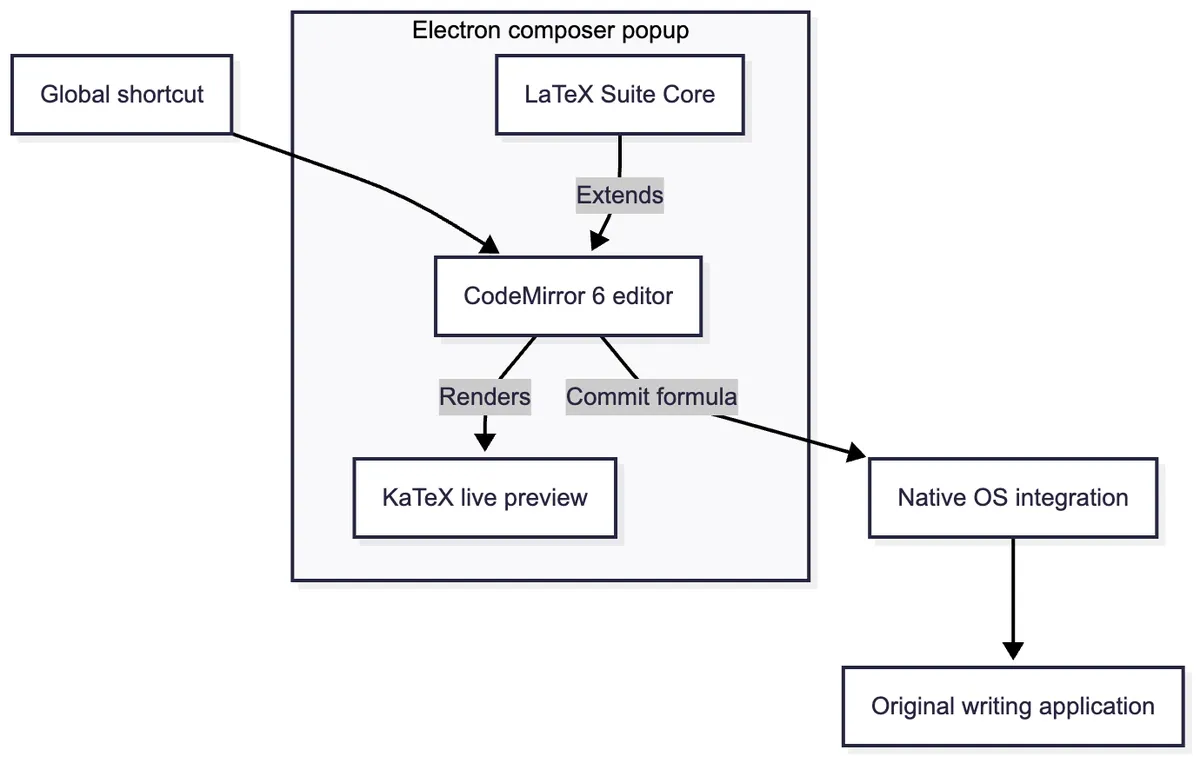
I was not trying to replace Obsidian, Notion, SiYuan, Zhihu, or a full LaTeX editor. I wanted something closer to a LaTeX input method: open it anywhere, write the formula, and return the source to the application I was already using.
In 2025, I finally had the courage to try, with capable AI help. I finished the core, but other affairs got in the way and I abandoned the desktop app halfway through. I returned to it in 2026 and completed the missing half. The first release, v0.1.0, brought LaTeX Suite to Windows. The v0.2.0 release brings it to macOS.
How the desktop app is built
The app has three main layers.
1. The editor core
The editor itself is LaTeX Suite Core, the extracted CodeMirror 6 extension. It retains the features that made Obsidian LaTeX Suite most productive: automatic and Tab-triggered snippets, regular-expression snippets, tabstops, automatic fractions, matrix shortcuts, automatic bracket enlargement, and other small transformations that reduce mechanical typing.
For example, the built-in rules can turn @a into \alpha, // into a fraction with tabstops, and x2 into x_{2}. More importantly, the snippet format is programmable. Rules can depend on context, operate on a selection, or compute their replacement with JavaScript.
2. The Electron composer
Electron is the cross-platform shell. When I press the global shortcut, it opens a small frameless composer near the application I was using. CodeMirror handles the editing, while KaTeX renders the result above it.
The whole buffer is one display formula, so I do not have to wrap the expression in $$ ... $$. I write the expression, inspect the preview, and send the LaTeX source back to the original application.
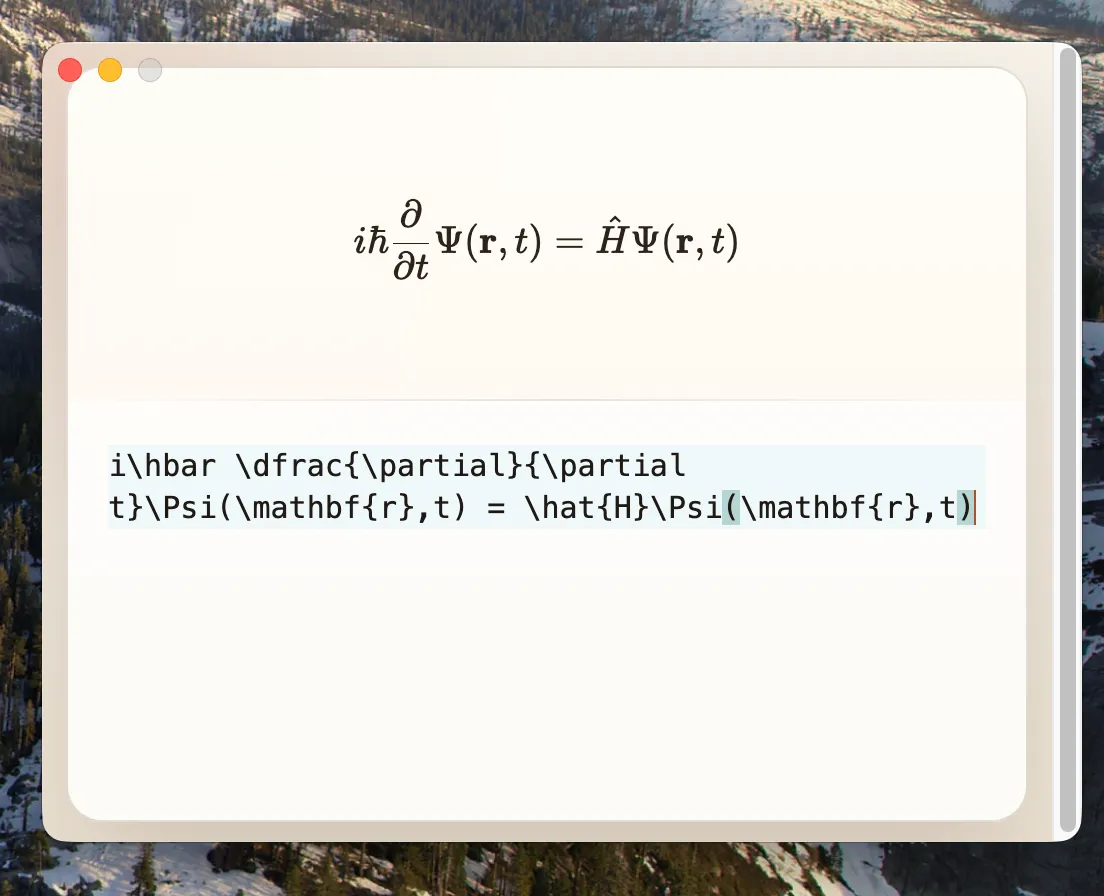
Electron also manages the system tray, settings, configurable global shortcut, launch-at-login preference, snippet files, and the lifecycle of each composition session.
The desktop and shared-contract packages live in a pnpm workspace. Most of the app is written in TypeScript, bundled with electron-vite, and packaged with electron-builder. GitHub Actions runs the test suite and produces the Windows and macOS artifacts attached to each release.
3. Native integration with the operating system
The difficult part is getting the finished formula back into the application that opened the composer. The app must remember which window invoked it, capture text when required, return focus to that window, and insert the finished expression at the correct place.
On Windows, this is handled by a small .NET native bridge. On macOS, it is handled by an in-process Objective-C++ module exposed to Electron through Node-API and built on the macOS Accessibility, clipboard, application, and event APIs. The desktop layer talks to these platform-specific implementations through the same small contract: find the foreground window, read and write the clipboard, restore focus, send keys, and wait for shortcut keys to be released.
The app preserves the previous clipboard contents during a successful composition session and restores them after inserting the formula. On macOS, Accessibility permission is required because returning to another application and sending the paste command are privileged system interactions.
I tried my best to keep the boundary between the UI and the platform-specific code small. Most of the UI and LaTeX behavior is shared across platforms; only the part that talks directly to the operating system is platform-specific.
What LaTeX Suite can do
The current app runs in the background on Windows and macOS. By default, pressing Ctrl + . opens the composer, although the shortcut can be changed in Settings. The tray menu can also open the composer and switch its interaction mode.
There are three modes:
- Insert opens an empty composer and inserts the finished LaTeX at the current cursor position.
- Selection Replace imports the text currently selected in the active application, lets me edit it with LaTeX Suite, and replaces that selection when I finish.
- Auto Selection Replace selects and imports the entire active text field, then replaces the whole field with the edited result. This is useful for formula fields that already contain an expression.
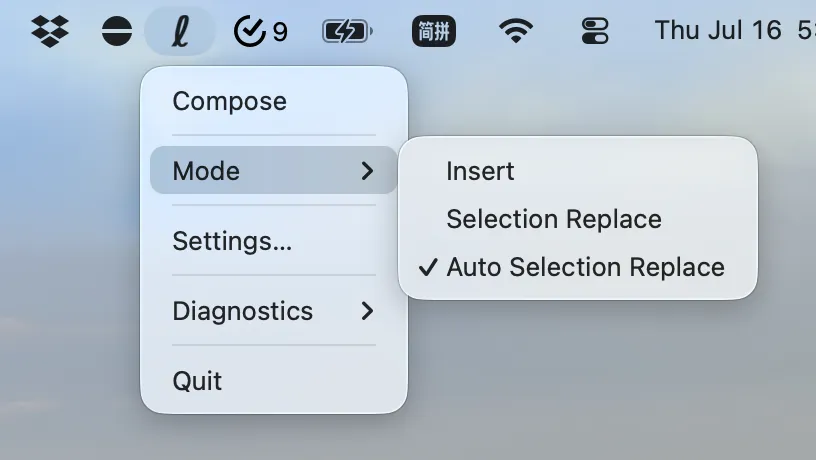
Inside the composer, you get:
- the built-in LaTeX Suite snippet collection;
- automatic snippets, regex snippets, visual snippets, and multi-step tabstops;
- automatic fraction and matrix editing shortcuts;
- a live KaTeX preview without adding display-math delimiters;
- custom snippet and snippet-variable files that can replace the defaults and be edited in any text editor; and
- keyboard-first completion: Esc inserts the result, while Shift + Esc discards the session.
The desktop shell adds practical features around that editor: a configurable global hotkey, launch at system startup, quick mode switching from the tray, adaptive tray icons, and optional diagnostic logging. Windows builds are available as both an installer and a portable executable. macOS builds are available for Intel and Apple Silicon as DMG and ZIP packages.
I do not want LaTeX Suite to become another note-taking app or Markdown editor. It edits LaTeX and sends the source back; that is all.
Returning to the original problem
The project began because I like Obsidian's formula editing extension Obsidian LaTeX Suite, but I wanted to use it in other applications. I also wanted a more efficient workflow than my existing AutoHotkey scripts.
Therefore, this project is what I wanted from the beginning: press a shortcut wherever I am writing, compose the formula efficiently, and return to what I was doing.
The current version of LaTeX Suite, v0.2.0, is still an early release, but it is already usable for many workflows. I hope it can help others who want to write formulas efficiently in any application.
LaTeX Suite is open source, and releases for Windows and macOS are available from the GitHub repository. The editor core builds on Obsidian LaTeX Suite by artisticat and its contributors. That project was itself inspired by Gilles Castel's setup using UltiSnips. I am grateful to everyone whose work made this project possible.
Btw, the macOS build is not signed yet, as I fail to see the point of paying Apple for the Developer Program account. If you are on macOS, you will need to follow the Mac User Guide to Open Anyway the app after downloading it. Maybe one day I will pay for that account... Maybe. If you feel uncomfortable with this, you can build the app from source yourself, by following the instructions in the README.